How StreamPipes is built.
StreamPipes is a set of services around a message broker. The core manages and monitors, extension services connect and process, and two databases keep history and configuration. You decide where each part runs: all on one host to try it out, or spread across plants and a data center in production.
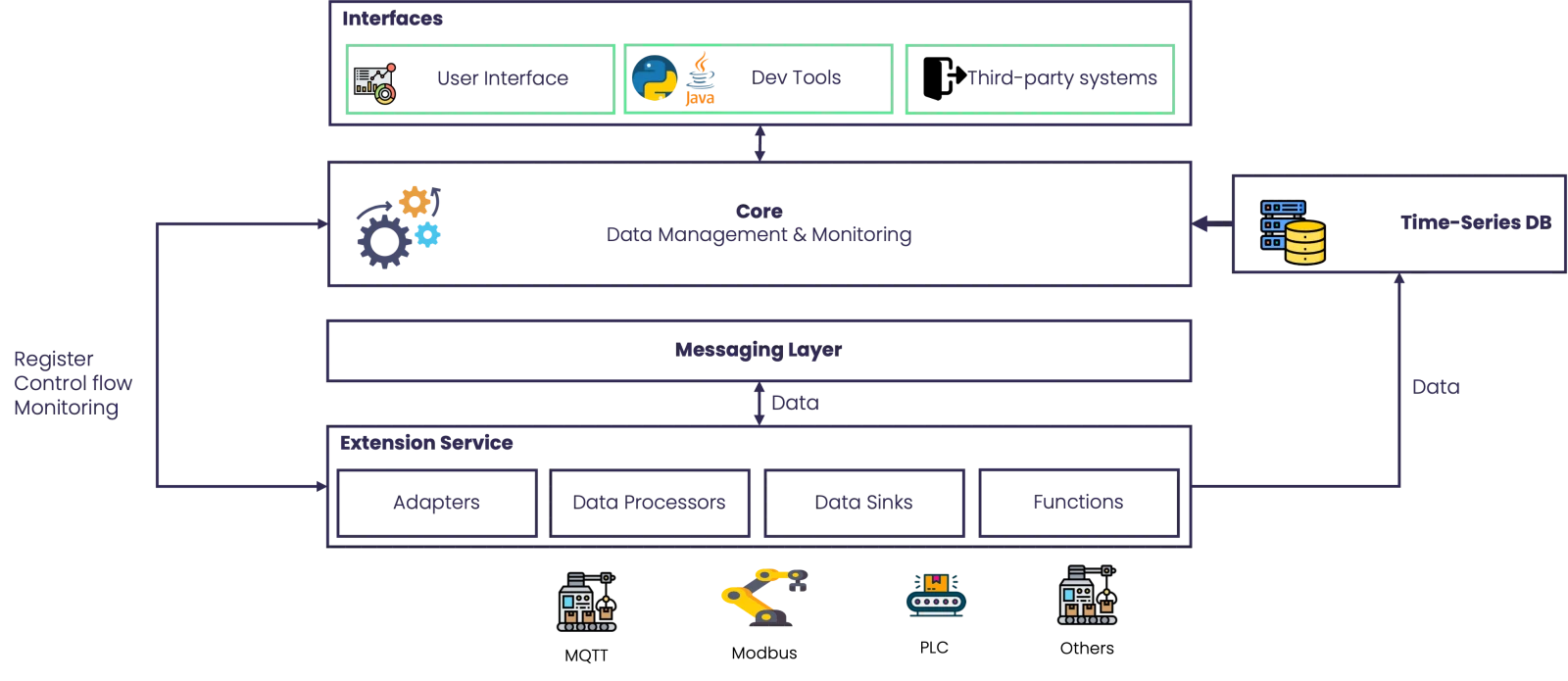
The parts.
Each service has one job. Together they cover connecting, processing, storing, visualizing and administering, with no custom integration layer in between.
User interface
An Angular web application for daily work: connecting sources, building pipelines, exploring datasets, creating charts and dashboards, managing assets, users and settings. It talks to the core over REST, and you can add your own modules and theme.
Core
The service that manages and monitors everything else. It stores metadata, checks and starts pipelines, watches adapters and other running components, serves the UI and the REST API, and takes care of users, roles, permissions and the audit log.
Messaging layer
A broker carries every event between adapters, processors and sinks, so no two services talk to each other directly. NATS is the default because it is small and copes well with being deployed near machines. Kafka, MQTT and Pulsar work too if that is what you already run.
Extension services
Services that bring adapters, processors, sinks and Functions. Several can register with one core, each with its own set, and each is deployed and updated on its own, ideally close to the systems it talks to.
Storage
A time-series database for datasets, and Apache CouchDB for configuration, metadata and user data. Both come with the standard installation. Retention rules keep the time-series database from growing without limit.
Clients and APIs
Java and Python clients, the REST API and Functions let other applications read resources, subscribe to live streams and control pipelines without the UI.
What happens
to an event.
An adapter turns raw signals into a typed stream. Pipelines work on that stream as events arrive. Datasets keep what you want to look at later, and charts and dashboards show it.
- 01Machines and systemsOPC UA, S7, MQTT, Kafka
- 02ConnectAdapters, schemas, units
- 03PipelinesProcessors and sinks
- 04DatasetsHistory and retention
- 05Charts and dashboardsOperators and teams
A stream is described once, with field types, measurement units and metadata. Every pipeline, chart and dashboard builds on that description, and the pipeline editor checks processors and sinks against it before anything runs.
New capabilities
without touching the core.
Each extension service registers its adapters, processors, sinks and Functions with the core. The built-in ones install while the platform runs. Your own, written with the SDK, run next to the systems they talk to.
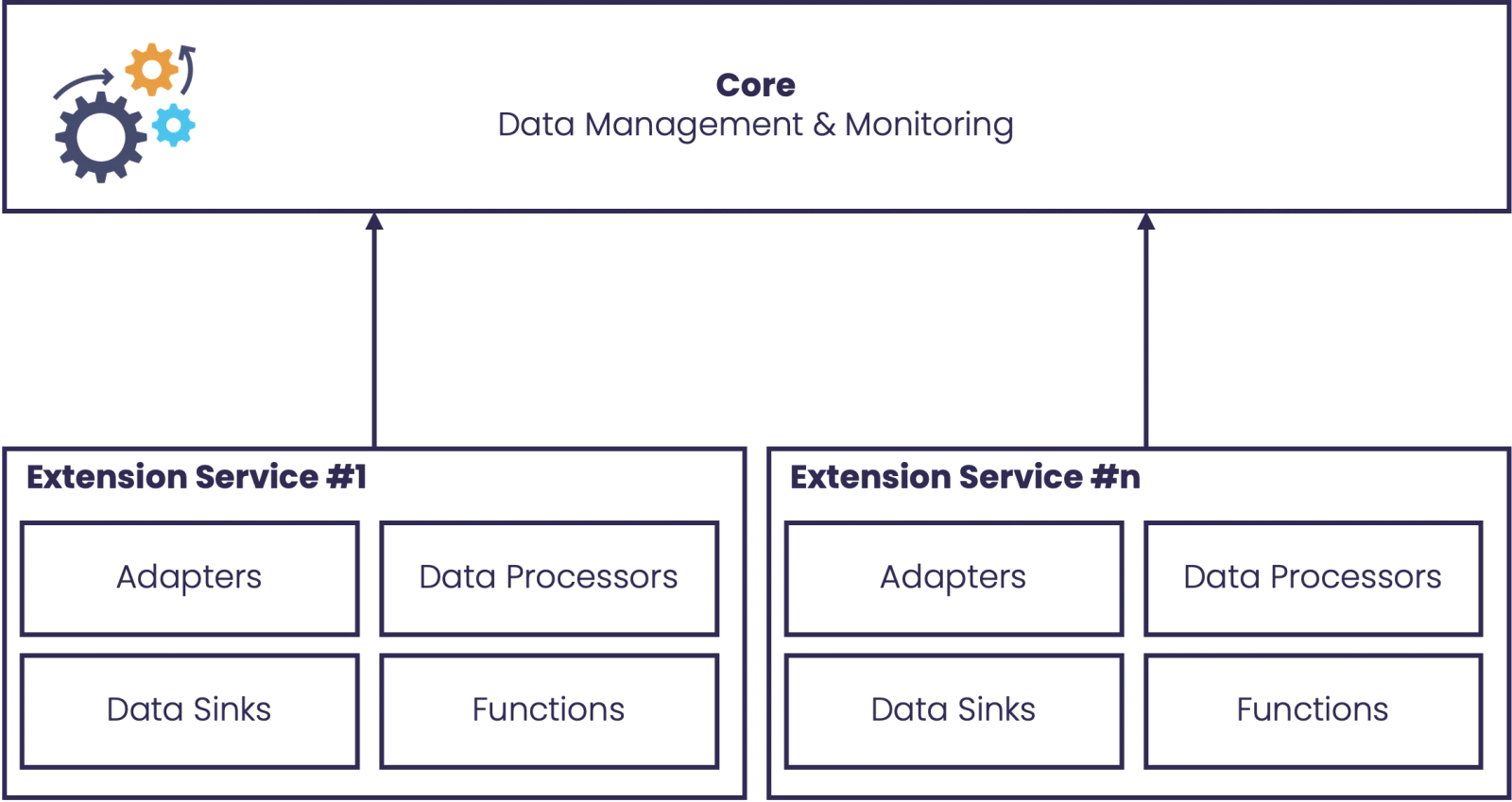
Extension services in the plant, the core in your data center.
Each plant runs a small extension service next to its PLCs and machines. The service connects outbound to the broker, so you do not open any ports into the OT network. The core, the storage and the heavier processing stay in IT.
- OTPlant networkPLCs, OPC UA servers and sensors feed an edge extension service with adapters and Functions
- FWFirewallEdge services connect outbound to the broker; no inbound ports on the OT side
- ITData center or cloudMessage broker, core with UI and APIs, time-series storage, processors and sinks
- 01
Run it where the data is
Put extension services into the plant network, next to the equipment, and keep the core in the data center or in the cloud. The broker connects the two.
- 02
Start small, grow in place
One Docker Compose host is enough to try things out. The same services scale out on Kubernetes with the Helm chart later, and your pipelines stay as they are.
- 03
The data stays yours
Everything runs on infrastructure you control. There is no usage metering and no proprietary format, and you can export a dataset whenever you want to.
HTTP or NATS between
the core and the extensions.
In many plants, opening an inbound port to a service is not an option. StreamPipes can route the traffic between the core and extension services through NATS instead of HTTP, so a service in a restricted network only ever connects outward.
The details are in the docs.
Components, the data model, the deployment models and the full configuration reference.