Architecture
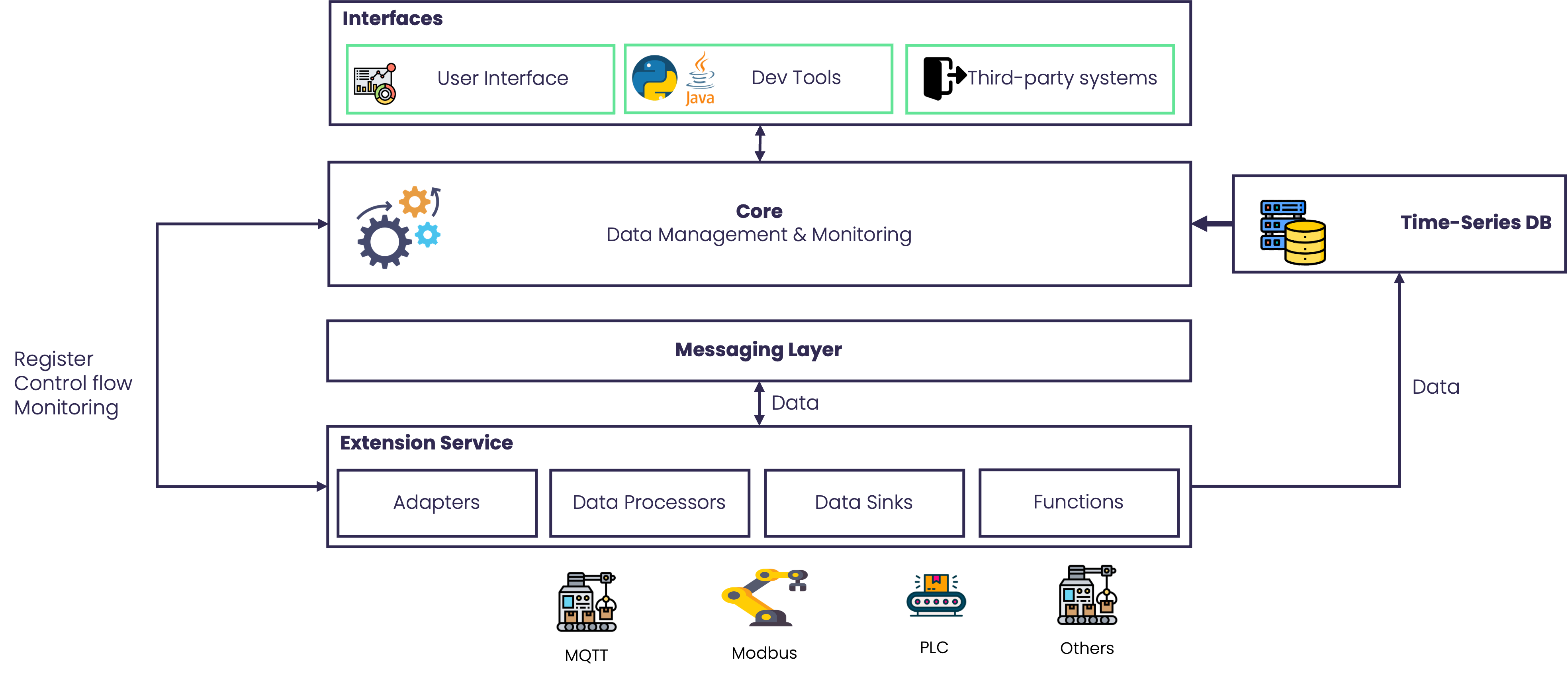
Apache StreamPipes is designed as a distributed industrial data platform. Its architecture supports sovereign deployments, real-time data processing, and extension points for company-specific integrations and analytics.
This page explains the technical building blocks behind that platform model. If you are new to StreamPipes, read Introduction first for the overall positioning and Terms for the core platform concepts.
Architecture at a glance
At a high level, a StreamPipes installation consists of:
- one central StreamPipes Core
- one or more extension services
- a web-based user interface
- bundled infrastructure components for messaging, time-series storage, and configuration storage
This architecture is intentionally distributed. It allows teams to run StreamPipes close to their data sources, split workloads across environments, and keep control over where industrial data is processed and stored.
StreamPipes Architecture
Why the architecture looks this way
Industrial data platforms have to solve for more than throughput. They also need to handle protocol diversity, OT/IT boundaries, deployment constraints, and long-term maintainability.
StreamPipes addresses this with a microservice-oriented architecture that is:
- distributed, so components can run where they fit operationally
- extensible, so new protocols and logic can be added without changing the core
- event-driven, so live machine data can move efficiently through the platform
- sovereign, so organizations can keep control over infrastructure, deployment topology, and data ownership
In practical terms, this means StreamPipes can serve both centralized and edge-near deployment scenarios.
StreamPipes Core
The StreamPipes Core is the central control plane of a StreamPipes installation. It manages the platform’s resources and coordinates the lifecycle of extensions and runtime artifacts.
Core responsibilities include:
- managing metadata for streams, pipelines, assets, datasets, and related resources
- coordinating adapters, processors, sinks, and functions provided by extension services
- exposing REST APIs for the user interface and external applications
- handling orchestration tasks such as registration, installation, and lifecycle management
- providing the foundation for permissions, configuration, and platform-wide consistency
The Core does not implement every protocol adapter or processing function itself. Instead, it acts as the central system that knows what is available, how components fit together, and how they should be operated as one platform.
Extension Services
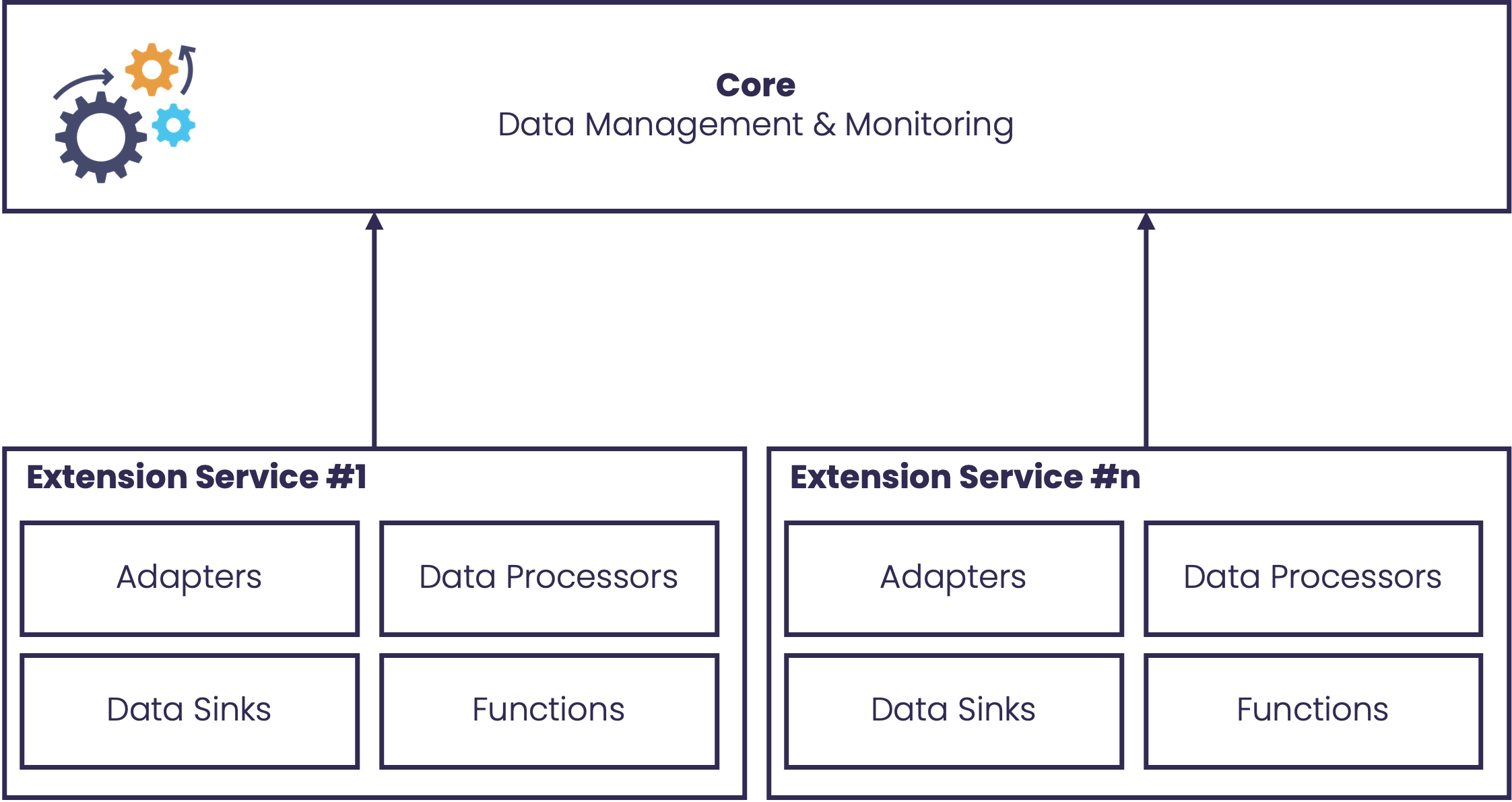
Extension services are microservices that contribute functional building blocks to StreamPipes. They can provide:
- adapters
- data processors
- data sinks
- functions
- additional domain-specific logic
Multiple extension services can be registered in one installation. Each service can provide a different set of capabilities, which makes the platform modular and easy to grow over time.
This model is especially valuable in industrial environments. Instead of modifying a monolithic application, teams can add new services for proprietary machines, internal analytics logic, or site-specific integrations.
Extensions can be developed with the SDK and deployed independently from the core platform. See Extending StreamPipes for implementation details.
StreamPipes Extension Services
User Interface
The web-based user interface is the main entry point for platform users. It provides access to the operational and analytical capabilities of StreamPipes, such as:
- configuring adapters and data sources
- building and operating pipelines
- exploring historical and live data
- managing assets, datasets, and configuration
- working with dashboards and platform administration features
From an architectural perspective, the UI is not a standalone tool layered loosely on top. It is a first-class part of the platform that interacts with the Core and exposes the capabilities registered by extension services.
The UI also helps strengthen the data-platform positioning of StreamPipes: it makes industrial data accessible not only to developers, but also to engineers, analysts, and operations users.
Messaging Layer
StreamPipes uses an external messaging layer as the backbone for live event exchange. Adapters, processors, sinks, and other components communicate through this event-driven layer instead of relying on direct point-to-point coupling.
Supported messaging systems include:
For many installations, NATS is a strong default because it is lightweight and fits well into distributed and OT-adjacent deployments. Other brokers may be preferred when an organization already standardizes on them or needs specific messaging capabilities.
The messaging layer is what allows StreamPipes to remain highly performant and focused on streaming data while keeping services decoupled.
Storage Components
In a standard StreamPipes installation, storage is split across dedicated infrastructure components that are deployed as part of the platform setup. StreamPipes separates different storage concerns instead of forcing all data into one subsystem.
The standard installation includes:
- InfluxDB for time-series data
- Apache CouchDB for configuration and user-related platform data
This separation reflects the different roles of the stored data:
- time-series storage supports historical analysis, charts, and monitoring
- configuration storage supports platform state, metadata, and management tasks
These databases are not described here as optional side tools. They are part of the default StreamPipes installation architecture and provide the persistence layers the platform relies on for historical data, metadata, and configuration state.
By combining these built-in storage components with a unified platform layer, StreamPipes provides a pragmatic architecture for industrial data workloads.
Deployment Across OT and IT Boundaries
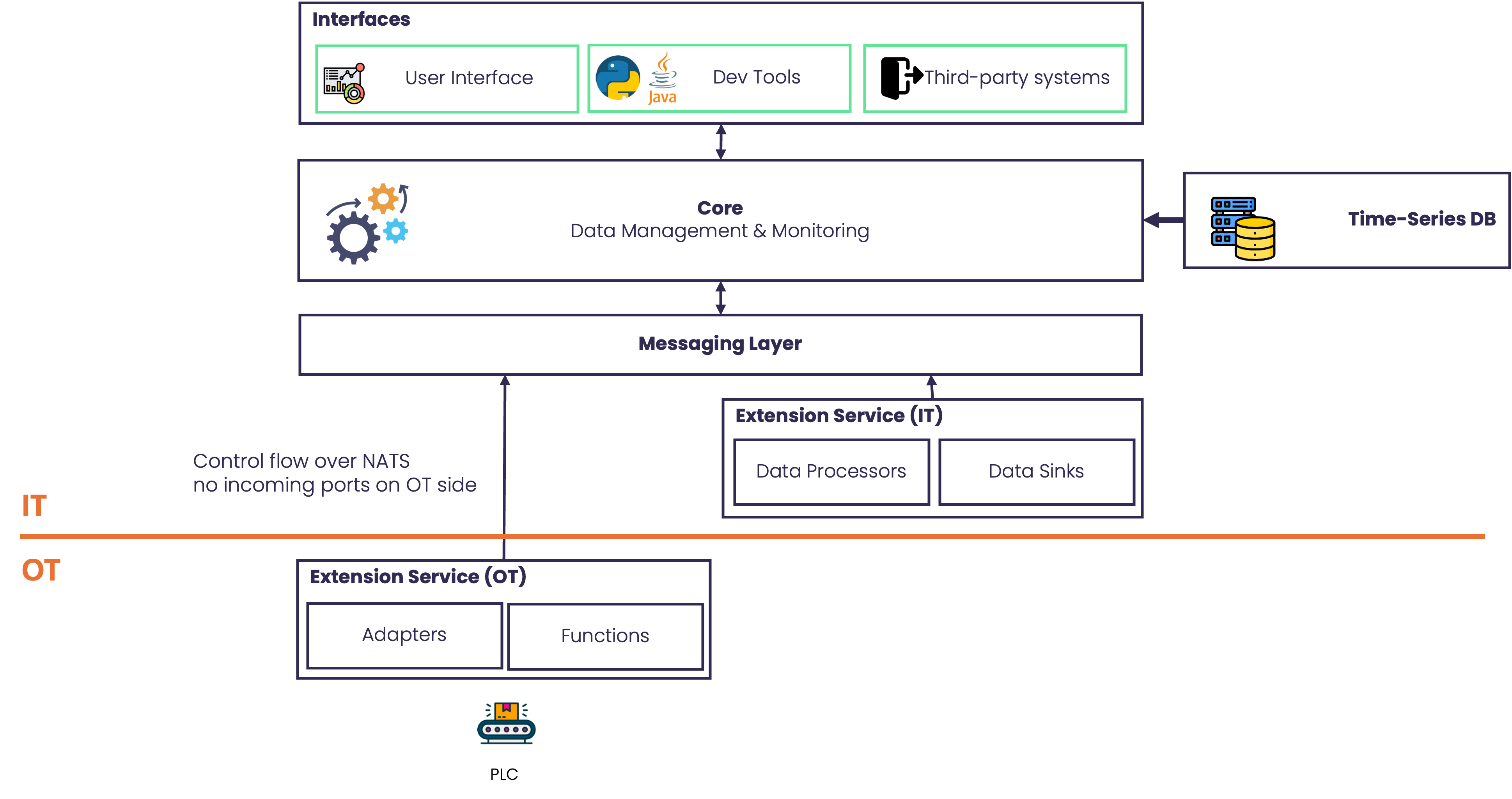
A key strength of StreamPipes is that Core and extension services do not have to run in the same network segment. They can be deployed across OT and IT environments depending on operational and security requirements.
For example:
- an extension service can run close to a machine or broker inside the OT network
- the Core, UI, and storage components can run in a central IT environment
- different sites can contribute extension services to one broader platform setup
This allows organizations to keep source-near integrations local while still building a shared industrial data platform at a higher level.
Distributed deployment
Communication Modes
Communication between the Core and extension services supports different transport modes, including HTTP and NATS.
This matters in real deployments. In some OT environments, opening inbound ports to extension services is undesirable or impossible. Using NATS-based communication can reduce that requirement and make it easier to deploy services in restricted networks.
This flexibility is another reason StreamPipes works well in industrial settings where network boundaries are part of the system design, not an afterthought.
Data Model and Schema Layer
At runtime, StreamPipes works with lightweight event payloads that are easy to transport and integrate with downstream systems. An event might look as simple as this:
{
  "timestamp": 1234556,
  "deviceId": "ABC",
  "temperature": 37.5
}
What makes StreamPipes more than a transport layer is the additional schema and semantic description managed by the platform.
For a field such as temperature, StreamPipes can also keep metadata such as:
{
  "label": "Temperature",
  "description": "Measures the temperature during leakage tests",
  "measurementUnit": "https://qudt.org/vocab/unit/DEG_C",
  "runtimeName": "temperature",
  "runtimeType": "xsd:float",
  "semanticType": "https://my-company-vocabulary/leakage-test-temperature"
}
This separation between runtime payload and descriptive schema is important:
- runtime events stay compact and integration-friendly
- users still benefit from rich semantics, validation, and better guidance in the UI
- clients and extensions can work with data that is not only available, but also understandable
In other words, StreamPipes treats industrial data as structured information, not just message traffic.
APIs, SDKs, and Developer Access
StreamPipes is not only operated through the browser. It also provides developer-facing access through:
- REST APIs
- SDKs for building pipeline elements and extensions
- client libraries for programmatic access (Java, Python and Go)
This supports use cases such as:
- integrating StreamPipes into internal applications
- automating pipeline lifecycle operations
- developing custom adapters, processors, and sinks
- building data analytics workflows around live or historical machine data
Implementation
The core platform is primarily implemented in Java. Additional programming languages for developers who want to interact with StreamPipes are available for Python, Java and Go.
The UI is built with TypeScript and Angular.
Python support enables data-science-oriented workflows around StreamPipes.
For data stream, StreamPipes provides its own stream processing framework that routes data from sources to data processors and sinks. The system is capable of processing thousands to tens of thousands events per second with sub-second latency out of the box, depending on the use case and data structure. For scenarios that require even more throughput or latency, there are many ways to fine-tune the system. The see Environment Variables section for configuration options.