Deployment options
Introduction
StreamPipes supports several deployment models, from a simple single-host installation to distributed industrial setups with extension services running close to machines. This page explains how to deploy StreamPipes with Docker Compose or Kubernetes, how broker and transport choices affect the setup, and which configuration options are available in the current Helm chart.
At a high level, every deployment contains the same main parts:
CoreandUIprovide the central platform services and browser interface.CouchDBstores metadata, configuration, users, pipelines, adapters, dashboards, assets, and other platform objects.InfluxDBstores persisted event data and datasets.- One or more
extension servicesprovide adapters, processors, and sinks. - A broker such as
NATS,Kafka, orPulsartransports events between runtime components.
Deployment models
Choose the deployment model based on where StreamPipes runs and how much operational control you need:
Docker Composeis the fastest way to install StreamPipes on one host. It is a good fit for evaluation, demos, local environments, and smaller installations.Kubernetesis the right option when you need cluster-level operations, service management, persistent storage classes, ingress control, and more explicit infrastructure configuration.Distributed deploymentsare useful when extension services should run outside the central data center, for example in the OT network or on edge systems close to industrial machines.
Docker Compose deployment
The repository contains several ready-to-run Compose presets in the StreamPipes source tree:
- docker-compose.yml
- docker-compose.kafka.yml
- docker-compose.minimal.yml
- docker-compose.nats-auth.yml
- docker-compose.minimal.nats-auth.yml
- Compose README
Default Compose setup
The default preset is docker-compose.yml. It installs:
backenduicouchdbinfluxdbnatsextensions-all-iiot
This is the recommended starting point for new installations. It uses NATS as the internal event broker and the standard IIoT-focused extension package.
Start it with:
docker-compose up -d
Stop it with:
docker-compose down
Remove the persisted volumes as well:
docker-compose down -v
Kafka-based Compose setup
If your environment already standardizes on Kafka, use docker-compose.kafka.yml. This variant replaces NATS with Kafka and configures StreamPipes accordingly.
Start it with:
docker-compose -f docker-compose.kafka.yml up -d
Minimal Compose setup
docker-compose.minimal.yml is the leanest preset. It uses the minimal IIoT extension service and is useful when you want a smaller footprint and do not need the full catalog of adapters and pipeline elements.
Start it with:
docker-compose -f docker-compose.minimal.yml up -d
Token-based NATS authentication
If you want to protect internal NATS communication with a token, set SP_NATS_TOKEN and add the auth override file:
docker-compose -f docker-compose.yml -f docker-compose.nats-auth.yml up -d
For the minimal setup:
docker-compose -f docker-compose.minimal.yml -f docker-compose.minimal.nats-auth.yml up -d
When to use Compose
Use Compose when you want:
- a fast installation on one machine
- a documented reference setup
- a simple way to compare the
default,kafka, andminimalvariants - a development or test environment that closely matches the official installer
Distributed deployments
A central advantage of StreamPipes is that extension services do not have to run in the same place as the UI and core. In industrial environments, this matters because data sources often live in restricted OT networks or on edge systems close to production equipment.
Distributed deployment
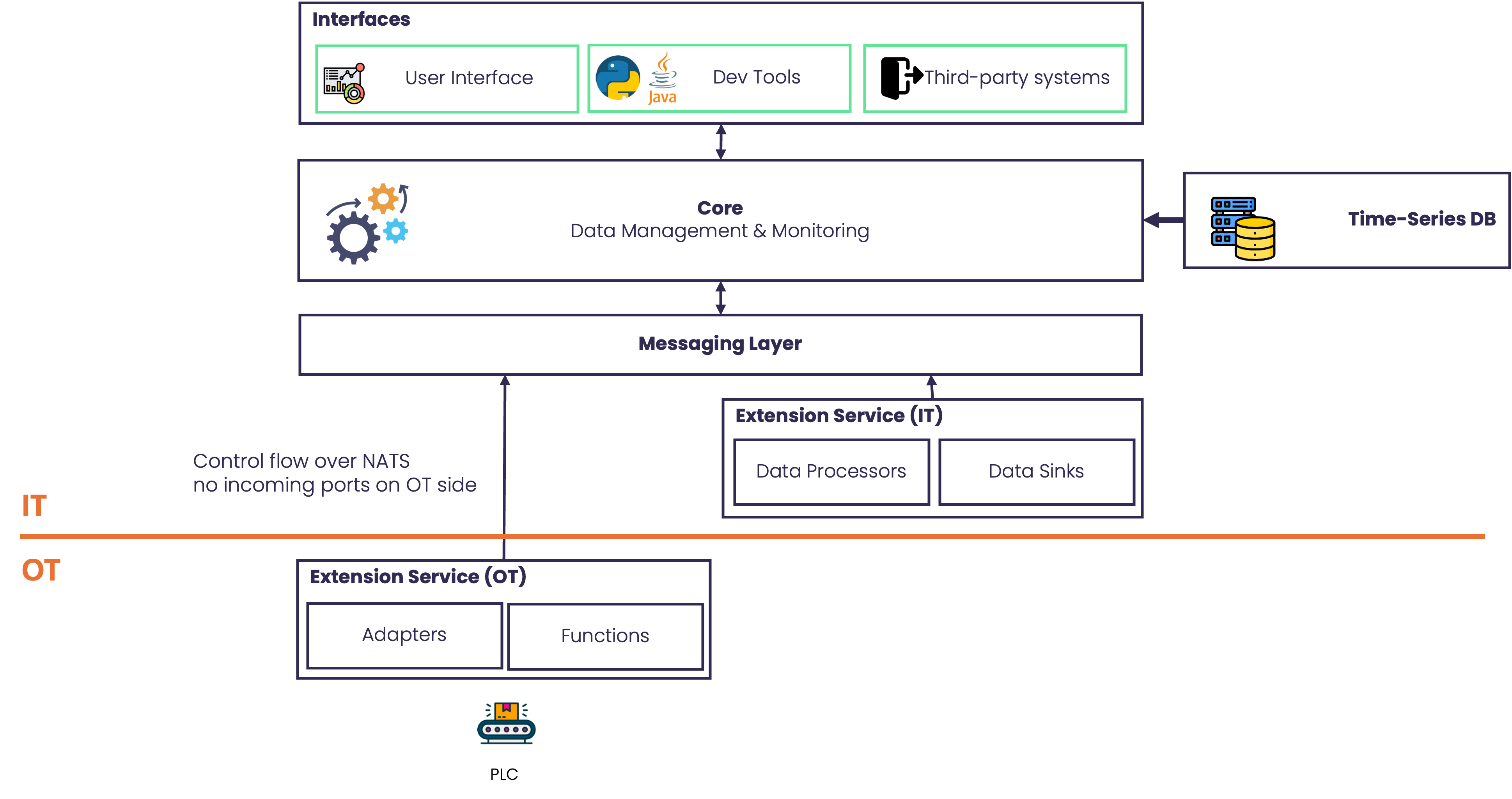
A common topology looks like this:
Central IT environment: UI, Core, CouchDB, InfluxDB, the main broker and an extension service with data processors and sinks.OT or edge environment: one or more extension services that connect to local machines, PLCs, brokers, or APIs
This split is useful when:
- machine data should stay inside a plant network as long as possible
- adapter traffic should terminate close to the source
- firewall rules allow controlled service-to-service communication but not full central access to machines
- lower latency is needed for ingestion or preprocessing
In practice, an extension service in the OT network can:
- collect data from local sources
- normalize or preprocess the events
- expose adapters and pipeline elements to the central StreamPipes installation
- forward stream events through the configured message broker
To reflect the security requirements typically found in OT networks, by enabling the NATS-based transport mode (see below), no incoming traffic needs to be allowed for the OT extension service, while adapters can still be managed from the central StreamPipes instance.
This means StreamPipes can be operated as a central industrial data platform while still placing data collection and processing components near the edge.
Message brokers
StreamPipes supports different brokers for transporting events between adapters, processors, and sinks. In deployment terms, the broker is a core runtime decision because it affects both the infrastructure you install and the broker-specific configuration values you provide.
Supported Message Brokers
NATS
NATS is the recommended default for new installations.
Use NATS when you want:
- the simplest current reference setup
- a lightweight internal broker
- an easy path into distributed deployments with StreamPipes extension services
Kafka
Kafka remains available and is a good choice when:
- your organization already operates Kafka
- event streams should integrate with an existing Kafka-based data platform
- operational standards already assume Kafka tooling and operations
The Compose installer includes a dedicated Kafka preset, and the Helm chart keeps Kafka configuration values.
Pulsar
Pulsar is also part of the Kubernetes configuration model. It is relevant when your infrastructure already uses Pulsar or when you want StreamPipes to align with a Pulsar-based streaming environment.
MQTT
MQTT can also be configured but, similar to Pulsar, must be used from a custom docker compose setup which includes an MQTT broker. See the Environment Variables page for MQTT-specific configuration options.
Unlike NATS and Kafka, there is no dedicated Compose preset for Pulsar in the standard installer. In practice, Pulsar is therefore mainly a Kubernetes or custom-deployment topic.
Choosing a broker setup
You should decide at installation time which protocol StreamPipes should use for internal communication. The protocol can be set by providing an environment variable to the core (backend) service.
# Use nats
SP_PRIORITIZED_PROTOCOL=nats

# Use kafka
SP_PRIORITIZED_PROTOCOL=kafka

# Use pulsar
SP_PRIORITIZED_PROTOCOL=pulsar

# Use mqtt
SP_PRIORITIZED_PROTOCOL=mqtt
HTTP and NATS transport modes
It is important to distinguish two different communication paths:
Event transportCore-to-extension service transport
These are related, but they are not the same.
Event transport
Event transport is controlled primarily through SP_PRIORITIZED_PROTOCOL in the backend. This decides which messaging system StreamPipes should prioritize for exchanging events between runtime components.
Examples:
natsin the default Compose setupkafkain the Kafka Compose setup
Core-to-extension service transport
Core-to-extension communication is controlled separately. The relevant settings are:
SP_CORE_EXTENSION_TRANSPORT_MODEon the core sideSP_EXTENSION_TRANSPORT_MODEon the extension side
The currently supported modes are:
- Core:
http,nats, orauto - Extension service:
http,nats, ordual
Use them as follows:
HTTPis the simplest direct model. Core sends requests directly to the extension service over HTTP.NATSuses request/reply over NATS for core-to-extension communication.AUTOon the core side prefers NATS when the service supports it and falls back to HTTP when necessary.DUALon the extension side allows a service to support both HTTP and NATS-based requests.
This distinction matters in distributed installations. For example:
- You may use
NATSas the event broker between runtime components. - At the same time, core may still reach an extension service over
HTTP. - Or you may move both event transport and core-to-extension requests to
NATSwhen that better fits a segmented or broker-centric network design.
The UI also needs to know where live adapter requests should be forwarded. In the Compose presets, this is configured through SP_HTTP_SERVER_ADAPTER_ENDPOINT, which points the UI proxy to the installed extension service.
Choosing a deployment pattern
Use the following rules of thumb:
- Start with
Docker Composeif you want the quickest supported installation. - Choose the default
NATSsetup unless there is a clear reason to align withKafka. - Use the
minimalCompose preset for smaller installations or leaner edge-style setups. - Move to
Kuberneteswhen you need cluster operations, ingress control, and persistent infrastructure management. - Place
extension servicesin the OT network or at the edge when data sources should stay close to the machine network. - Use
HTTPtransport first if you want the most direct service wiring. - Use
NATSorAUTOtransport modes when broker-based service communication fits the deployment better.
Kubernetes deployment
The Kubernetes deployment is provided as a Helm chart in the StreamPipes source repository. The central configuration file is:
Install the chart from the installer/k8s directory:
helm install streampipes ./
Remove it again with:
helm uninstall streampipes
Kubernetes is the better choice when you need:
- managed persistent volumes
- ingress or Traefik-based routing
- explicit service exposure rules
- cluster operations and lifecycle management
- flexible deployment of central services and extension services
Ingress and storage
The Helm chart supports both:
- standard Kubernetes
Ingress - Traefik
IngressRoute
It also supports storage customization through the storageClassName values for the persistent components.
Kubernetes configuration reference
The following tables summarize the Helm values that are currently exposed in the Kubernetes installer.
Common parameters
| Parameter Name | Description | Value |
|---|---|---|
| deployment | Deployment type (lite or full) | lite |
| preferredBroker | Preferred broker for deployment | "nats" |
| monitoringSystem | Enable monitoring system (true or false) | false |
| pullPolicy | Image pull policy | "Always" |
| restartPolicy | Restart policy for the container | Always |
| persistentVolumeReclaimPolicy | Reclaim policy for persistent volumes | "Delete" |
| persistentVolumeAccessModes | Access mode for persistent volumes | "ReadWriteOnce" |
| initialDelaySeconds | Initial delay for liveness and readiness probes | 60 |
| periodSeconds | Interval between liveness and readiness probes | 30 |
| failureThreshold | Number of consecutive failures for readiness probes | 30 |
| hostPath | Host path for the application | "" |
StreamPipes common parameters
| Parameter Name | Description | Value |
|---|---|---|
| streampipes.version | StreamPipes version | "0.99.0-SNAPSHOT" |
| streampipes.registry | StreamPipes registry URL | "apachestreampipes" |
| streampipes.auth.secretName | Secret name for storing secrets | "sp-secrets" |
| streampipes.auth.users.admin.user | Initial admin user | "admin@streampipes.apache.org" |
| streampipes.auth.users.admin.password | Initial admin password | "admin" |
| streampipes.auth.users.service.user | Initial service account user | "sp-service-client" |
| streampipes.auth.users.service.secret | Initial service account secret | empty (auto-generated) |
| streampipes.auth.encryption.passcode | Passcode for value encryption | empty (auto-generated) |
| streampipes.core.appName | StreamPipes backend application name | "backend" |
| streampipes.core.port | StreamPipes backend port | 8030 |
| streampipes.core.persistence.storageClassName | Storage class name for backend PVs | "hostpath" |
| streampipes.core.persistence.storageSize | Size of the backend PV | "1Gi" |
| streampipes.core.persistence.claimName | Name of the backend PersistentVolumeClaim | "backend-pvc" |
| streampipes.core.persistence.pvName | Name of the backend PersistentVolume | "backend-pv" |
| streampipes.core.service.name | Name of the backend service | "backend" |
| streampipes.core.service.port | Target port of the StreamPipes backend service | 8030 |
| streampipes.ui.appName | StreamPipes UI application name | "ui" |
| streampipes.ui.resolverActive | Enable DNS resolver for the Nginx proxy | true |
| streampipes.ui.port | StreamPipes UI port | 8088 |
| streampipes.ui.resolver | DNS resolver for the Nginx proxy | "kube-dns.kube-system.svc.cluster.local" |
| streampipes.ui.service.name | Name of the UI service | "ui" |
| streampipes.ui.service.type | Type of the UI service | "ClusterIP" |
| streampipes.ui.service.nodePort | Node port for the UI service | 8088 |
| streampipes.ui.service.port | Target port of the StreamPipes UI service | 8088 |
| streampipes.ingress.active | Enable Ingress for StreamPipes | false |
| streampipes.ingress.annotations | Annotations for Ingress | {} |
| streampipes.ingress.host | Hostname for Ingress | "" |
| streampipes.ingressroute.active | Enable IngressRoute for StreamPipes | true |
| streampipes.ingressroute.annotations | Annotations for IngressRoute | {} |
| streampipes.ingressroute.entryPoints | Entry points for IngressRoute | ["web", "websecure"] |
| streampipes.ingressroute.host | Hostname for IngressRoute | "" |
| streampipes.ingressroute.certResolverActive | Enable certificate resolver for IngressRoute | true |
| streampipes.ingressroute.certResolver | Certificate resolver for IngressRoute | "" |
Extensions common parameters
| Parameter Name | Description | Value |
|---|---|---|
| extensions.iiot.appName | IIoT extensions application name | extensions-all-iiot |
| extensions.iiot.imageName | Container image name for the extensions | extensions-all-jvm |
| extensions.iiot.port | Port for the IIoT extensions application | 8090 |
| extensions.iiot.service.name | Name of the IIoT extensions service | extensions-all-iiot |
| extensions.iiot.service.port | Target port of the IIoT extensions service | 8090 |
External common parameters
CouchDB common parameters
| Parameter Name | Description | Value |
|---|---|---|
| external.couchdb.appName | CouchDB application name | "couchdb" |
| external.couchdb.version | CouchDB version | 3.3.1 |
| external.couchdb.user | CouchDB admin username | "admin" |
| external.couchdb.password | CouchDB admin password | empty (auto-generated) |
| external.couchdb.port | Port for the CouchDB service | 5984 |
| external.couchdb.service.name | Name of the CouchDB service | "couchdb" |
| external.couchdb.service.port | Target port of the CouchDB service | 5984 |
| external.couchdb.persistence.storageClassName | Storage class name for CouchDB PVs | "hostpath" |
| external.couchdb.persistence.storageSize | Size of the CouchDB PV | "1Gi" |
| external.couchdb.persistence.claimName | Name of the CouchDB PersistentVolumeClaim | "couchdb-pvc" |
| external.couchdb.persistence.pvName | Name of the CouchDB PersistentVolume | "couchdb-pv" |
InfluxDB common parameters
| Parameter Name | Description | Value |
|---|---|---|
| external.influxdb.appName | InfluxDB application name | "influxdb" |
| external.influxdb.version | InfluxDB version | 2.6 |
| external.influxdb.username | InfluxDB admin username | "admin" |
| external.influxdb.password | InfluxDB admin password | "sp-admin" |
| external.influxdb.adminToken | InfluxDB admin token | empty (auto-generated) |
| external.influxdb.initOrg | InfluxDB initial organization | "sp" |
| external.influxdb.initBucket | InfluxDB initial bucket | "sp" |
| external.influxdb.initMode | InfluxDB initialization mode | "setup" |
| external.influxdb.apiPort | Port number for the InfluxDB API service | 8083 |
| external.influxdb.httpPort | Port number for the InfluxDB HTTP service | 8086 |
| external.influxdb.grpcPort | Port number for the InfluxDB gRPC service | 8090 |
| external.influxdb.service.name | Name of the InfluxDB service | "influxdb" |
| external.influxdb.service.apiPort | Target port of the InfluxDB API service | 8083 |
| external.influxdb.service.httpPort | Target port of the InfluxDB HTTP service | 8086 |
| external.influxdb.service.grpcPort | Target port of the InfluxDB gRPC service | 8090 |
| external.influxdb.persistence.storageClassName | Storage class name for InfluxDB PVs | "hostpath" |
| external.influxdb.persistence.storageSize | Size of the InfluxDB PV | "1Gi" |
| external.influxdb.persistence.storageSizeV1 | Size of the InfluxDB PV for v1 databases | "1Gi" |
| external.influxdb.persistence.claimName | Name of the InfluxDB v2 PersistentVolumeClaim | "influxdb2-pvc" |
| external.influxdb.persistence.claimNameV1 | Name of the InfluxDB v1 PersistentVolumeClaim | "influxdb-pvc" |
| external.influxdb.persistence.pvName | Name of the InfluxDB v2 PersistentVolume | "influxdb2-pv" |
| external.influxdb.persistence.pvNameV1 | Name of the InfluxDB v1 PersistentVolume | "influxdb-pv" |
NATS common parameters
| Parameter Name | Description | Value |
|---|---|---|
| external.nats.appName | NATS application name | "nats" |
| external.nats.port | Port for the NATS service | 4222 |
| external.nats.version | NATS version | empty |
| external.nats.service.type | Type of the NATS service | "NodePort" |
| external.nats.service.externalTrafficPolicy | External traffic policy for NATS | "Local" |
| external.nats.service.name | Name of the NATS service | "nats" |
| external.nats.service.port | Target port of the NATS service | 4222 |
Kafka common parameters
| Parameter Name | Description | Value |
|---|---|---|
| external.kafka.appName | Kafka application name | "kafka" |
| external.kafka.version | Kafka version | 2.2.0 |
| external.kafka.port | Port for the Kafka service | 9092 |
| external.kafka.external.hostname | Hostname advertised to external clients | "localhost" |
| external.kafka.service.name | Name of the Kafka service | "kafka" |
| external.kafka.service.port | Target port of the Kafka service | 9092 |
| external.kafka.service.portOutside | Port for Kafka clients outside of the cluster | 9094 |
| external.kafka.persistence.storageClassName | Storage class name for Kafka PVs | "hostpath" |
| external.kafka.persistence.storageSize | Size of the Kafka PV | "1Gi" |
| external.kafka.persistence.claimName | Name of the Kafka PersistentVolumeClaim | "kafka-pvc" |
| external.kafka.persistence.pvName | Name of the Kafka PersistentVolume | "kafka-pv" |
Pulsar common parameters
| Parameter Name | Description | Value |
|---|---|---|
| external.pulsar.appName | Pulsar application name | "pulsar" |
| external.pulsar.version | Pulsar version | 3.0.0 |
| external.pulsar.port | Port for the Pulsar service | 6650 |
| external.pulsar.service.name | Name of the Pulsar service | "pulsar" |
| external.pulsar.service.port | Target port of the Pulsar service | 6650 |
| external.pulsar.persistence.storageClassName | Storage class name for Pulsar PVs | "hostpath" |
| external.pulsar.persistence.storageSize | Size of the Pulsar PV | "1Gi" |
| external.pulsar.persistence.claimName | Name of the Pulsar PersistentVolumeClaim | "pulsar-pvc" |
| external.pulsar.persistence.pvName | Name of the Pulsar PersistentVolume | "pulsar-pv" |
Monitoring common parameters
Prometheus
| Parameter Name | Description | Value |
|---|---|---|
| monitoring.prometheus.appName | Prometheus application name | "prometheus" |
| monitoring.prometheus.version | Prometheus version | 2.45.0 |
| monitoring.prometheus.port | Prometheus port | 9090 |
| monitoring.prometheus.service.name | Prometheus service name | "prometheus" |
| monitoring.prometheus.service.port | Prometheus service port | 9090 |
| monitoring.prometheus.persistence.storageClassName | Prometheus storage class name | "hostpath" |
| monitoring.prometheus.persistence.storageSize | Prometheus storage size | "2Gi" |
| monitoring.prometheus.persistence.claimName | Prometheus PVC claim name | "prometheus-pvc" |
| monitoring.prometheus.persistence.pvName | Prometheus PV name | "prometheus-pv" |
| monitoring.prometheus.persistence.tokenStorageSize | Prometheus token storage size | "16Ki" |
| monitoring.prometheus.config.scrapeInterval | Prometheus scrape interval | 10s |
| monitoring.prometheus.config.evaluationInterval | Prometheus evaluation interval | 15s |
| monitoring.prometheus.config.backendJobName | Prometheus backend job name | backend |
| monitoring.prometheus.config.extensionsName | Prometheus extensions job name | extensions-all-iiot |
| monitoring.prometheus.config.tokenFileName | Prometheus token file name | token |
| monitoring.prometheus.config.tokenFileDir | Prometheus token file directory | /opt/data |
Grafana
| Parameter Name | Description | Value |
|---|---|---|
| monitoring.grafana.appName | Grafana application name | "grafana" |
| monitoring.grafana.version | Grafana version | 10.1.2 |
| monitoring.grafana.port | Grafana port | 3000 |
| monitoring.grafana.service.name | Grafana service name | "grafana" |
| monitoring.grafana.service.port | Grafana service port | 3000 |
| monitoring.grafana.persistence.storageClassName | Grafana storage class name | "hostpath" |
| monitoring.grafana.persistence.storageSize | Grafana storage size | "1Gi" |
| monitoring.grafana.persistence.claimName | Grafana PVC claim name | "grafana-pvc" |
| monitoring.grafana.persistence.pvName | Grafana PV name | "grafana-pv" |
Auto-generated secrets in Kubernetes
The Helm chart generates several secret values automatically when they are left empty. This includes:
- the initial admin password
- the initial service account secret
- the encryption passcode
- the CouchDB password
- the InfluxDB password
- the InfluxDB admin token
This behavior is implemented in the chart's secrets.yaml template and is useful for first installations. In managed environments, many teams still choose to provide those values explicitly through their deployment process.
Related configuration pages
For the detailed environment-variable reference, continue with Environment Variables. For the operational view of registered services and runtime service configuration, see Extension Services.